Guides / Process
Revising a 5-Axis Prototype Between Iterations Without Restarting
October 27, 2026
A prototype is rarely right the first time. The first part shows a bracket that fouls a cable, a bore that needs a counterbore or a wall that flexes under load. Rev B follows, then often Rev C. The money and time you spend on those revisions depend less on how big the change is and more on how the change lands in the job the shop already built.
This guide separates the edits that reuse the existing program and fixture from the edits that restart the job, and gives you a short way to log changes so the shop does not guess. It continues the cost story in what a 5-axis prototype costs.
Why a revision can be cheap or expensive
The first order pays for the programming, the fixture design and the first-part checks. If the shop keeps those, Rev B pays only for the edits and for machine time. If the shop starts again, Rev B costs close to Rev A.
Three things carry over to the next revision:
- The CAM program. Toolpaths are tied to the geometry. A small change updates them, a big change rebuilds them.
- The fixture and the stock. Same blank, same clamp, same datum, same offsets.
- The proven approach. Which tool for which feature, which cutting data worked, where chips jammed.
A shop that holds all three can often deliver a small revision in less time than the first part took.
Cheap edits and reset edits
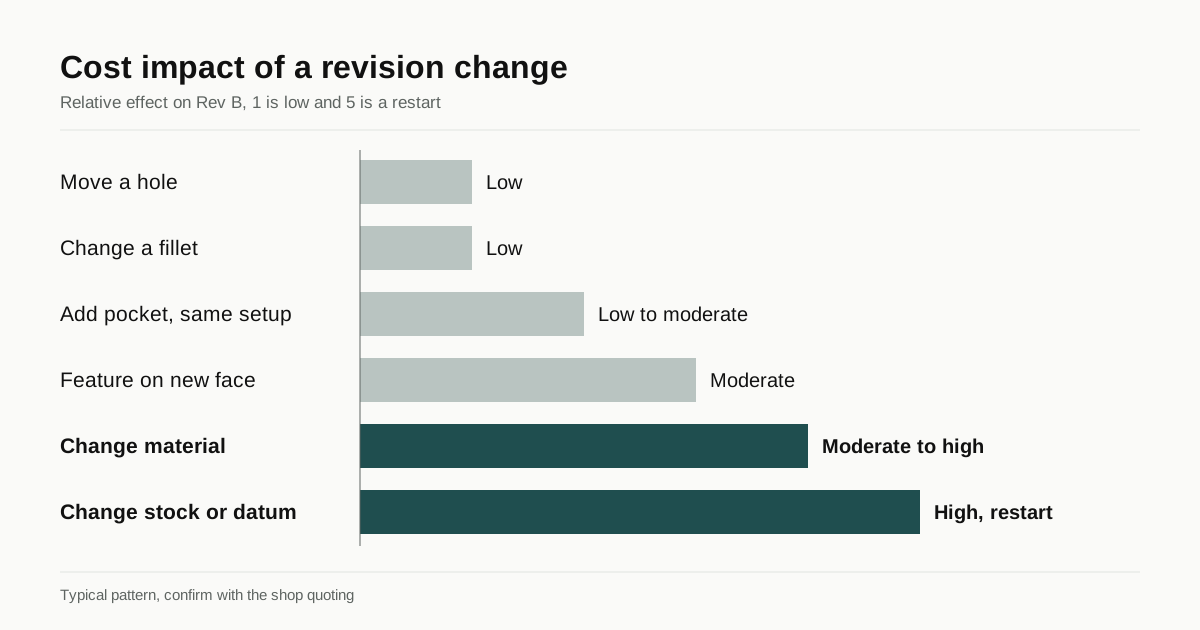
| Change | Effect on the job | Typical cost impact |
|---|---|---|
| Move a hole or change a diameter | Edit a drilling operation | Low |
| Change a fillet radius on a pocket | Edit toolpath and maybe tool | Low |
| Add or remove a pocket on an already-reached face | New operation, same setup | Low to moderate |
| Thicken or thin a wall | Edit toolpaths, check for deflection | Low to moderate |
| Change a thread size | New tool or cycle | Low |
| Add a feature on a face that was not reachable before | New orientation or setup | Moderate |
| Change the overall size beyond the stock block | New stock, new fixture position | High |
| Change the main datum or the clamping face | New fixture and offsets | High |
| Change material | New cutting data, maybe new tools and finish | Moderate to high |
| Merge two parts into one | New program for a new part | High |
Values are orientation only. The point is the pattern: changes inside the current stock block and setup are cheap, changes to stock, datum or holding are not.
Habits that keep revisions cheap
Freeze the datum. If the first part uses the bottom face and two holes as datums, keep those in every revision unless something forces a change. The fixture and the offsets stay valid.
Keep the stock envelope stable. If you grow the part outward by a few millimetres, the shop may need a bigger block. Checking the stock size with the shop before you change the model avoids a surprise.
Change one thing at a time when you can. If you change a bracket’s wall thickness and its hole pattern in the same revision and the part fails, you do not know which change caused it. Small steps give clearer test results and simpler programs.
Round to standard sizes. Using standard hole sizes and thread sizes means the shop’s existing tools carry across revisions. A new odd hole diameter needs a new tool or a boring pass.
Keep non-critical features stable. Cosmetic edge radii, label areas and relief cuts are easy to change but each one adds a toolpath. Hold them until the functional design is settled.
Keep the same shop when you can
Unless the first shop failed on quality or lead time, giving it Rev B is usually the cheaper path. It already has the program, the fixture and the lessons from the first cut. A new shop that quotes Rev B from scratch pays for programming and a learning curve. If you do change shops, send the first-part inspection data and a note on what went wrong, since that saves the new shop from repeating the mistake.
If the first shop was matched through an RFQ form, ask it directly whether it keeps programs on file and for how long. Many do, and a short note in the next RFQ referencing the earlier job helps.
How to log changes for the shop
A revision is a message to the shop, and the shop acts on what you send. A clean message has four parts:
- A revision letter in the file name and on the drawing. For example, bracket_RevB.step.
- A short change list. Two or three lines such as “Hole D moved 2 mm toward the edge; wall A thickened from 3 to 4 mm; no other changes.”
- Only current files. Remove old files from the thread or mark them superseded.
- A note on what you learned. For example, “Rev A fouled the connector at the top; Rev B adds a 6 mm relief.”
The shop can then compare Rev B with the program it already holds and edit it. Without the change list, it must compare the models itself, which takes time and risks a missed change.
Using the first part as a measurement tool
Rev A is a measuring instrument for the design. Before ordering Rev B, test it for what it was made to show. Useful practice:
- Fit-check against the mating part. Measure the real clearance, not just the nominal one.
- Note which dimensions mattered. If an unimportant tolerance cost money and a loose one caused trouble, adjust both in Rev B.
- Note where cutter marks or burrs got in the way. If a feature is hard to deburr, redesign it.
- Send the shop’s inspection data back. If the shop measured a bore as 0.03 mm over, say whether that was acceptable.
Order quantity across revisions
If you expect many revisions, order one or two pieces per revision. If testing needs several pieces and you are fairly sure of the design, ordering a few extra now often costs less than a separate order later, since setup and programming are paid once. A short plan in the RFQ, such as “two pieces now, five after test”, helps the shop quote a path rather than a single order. For quantities up to 200, see low volume 5-axis machining.
Checklist before you send Rev B
- Revision letter in the file name and on the drawing.
- A change list of two or three lines.
- The same datum and stock envelope as Rev A, unless you flag a change.
- Notes on what Rev A taught you, including inspection data.
- Only current files in the message.
- The quantity for this revision and the likely next one.
Send the revision through the RFQ page. We match it with up to three 5-axis shops, you get a reply within 24 business hours and the quotes come to you directly.
Frequently asked questions
Is Rev B cheaper than Rev A?
Often, when the same shop keeps the program and fixturing and the change is small. The shop edits toolpaths instead of building them again. A different shop pays the full programming cost again.
Which changes reset the job?
Changes to the stock size, the main datum, the holding method or the orientation of most features. These change the setup, so the old program is not a base any more.
How should I label revisions for the shop?
Use a revision letter in the file name and drawing, list what changed in two or three lines and send only the current files. Old files left in the thread cause wrong quotes and wrong parts.
Need this prototype quoted?
Send the drawing. We match you with up to 3 5-axis shops and reply within 24 business hours.
Get matched with a 5-axis shop